Connector for bluefox.email – Newsletter and WooCommerce Marketing
Connector for bluefox.email links your WordPress site and WooCommerce store to your bluefox.email account. Every feature is a module you switch on or off, so the plugin only loads what you use.
What it does
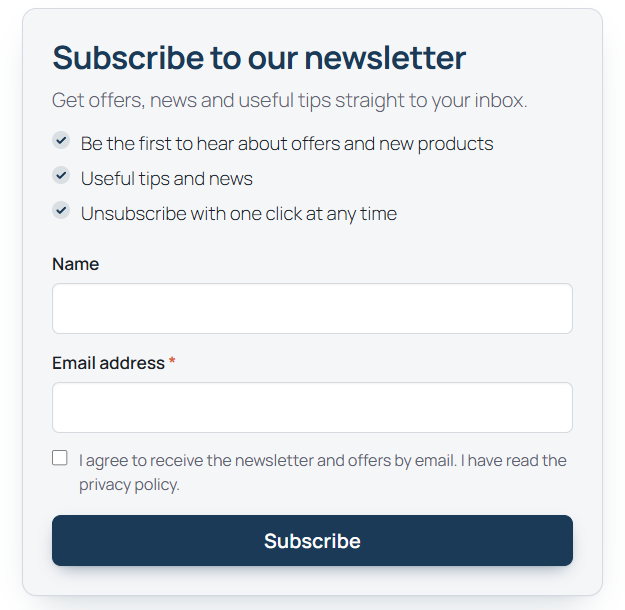
- Signup forms – a block, the
[cfbe_form]shortcode, a compact promo bar and a popup with scroll, delay, exit-intent and page-view triggers. Double opt-in is handled by your bluefox list. Read more - WooCommerce opt-in and welcome coupon – an unticked newsletter checkbox on the classic and block checkout, and a single-use coupon locked to the subscriber's email, created only after they confirm. Read more
- Order and abandoned cart emails – send your own bluefox emails on order events, and remind shoppers of carts they left, with an optional recovery coupon. Read more
- Contact sync – keep bluefox contacts enriched with user and customer data (order count, total spent, last order date…) for segmentation. Read more
- Email delivery – route
wp_mail()through the bluefox transactional API. Read more - Form plugin integrations – subscribe people from Contact Form 7, WPForms, Fluent Forms, Gravity Forms and Elementor Pro forms. Read more
- Preferences page and webhooks – your own translatable unsubscribe / pause page, and bluefox events stored in WordPress. Read more
- AI agent access (experimental) – let an AI agent read and change the settings through the WordPress Abilities API. Read more
Requirements
| Version | |
|---|---|
| WordPress | 6.7 or newer (6.9+ for AI agent access) |
| PHP | 8.1 or newer |
| WooCommerce | optional, 9.0 or newer – HPOS and the block checkout are supported |
| bluefox.email | an account with a project and an API key |
Magyar fordítás – Hungarian translation included
The complete Hungarian translation ships with the plugin: wp-admin, the signup form and popup, the checkout opt-in, the preferences page and the ready-made email texts. Set Settings → General → Site Language to Magyar and the plugin is in Hungarian – nothing to download. See Languages.
Where to start
- Install the plugin.
- Connect it to bluefox.email.
- Set up double opt-in on your bluefox list.
- Switch on the features you need.
- Create the thank-you and preferences pages and register the webhook.
Not an official bluefox.email product
The plugin is developed by Peter Kulcsár - KREMONT s.r.o. and released under GPL-2.0-or-later. It is not developed by or affiliated with bluefox.email.