Welcome coupon
Switch: Welcome coupon (needs WooCommerce). Settings: Coupon tab.
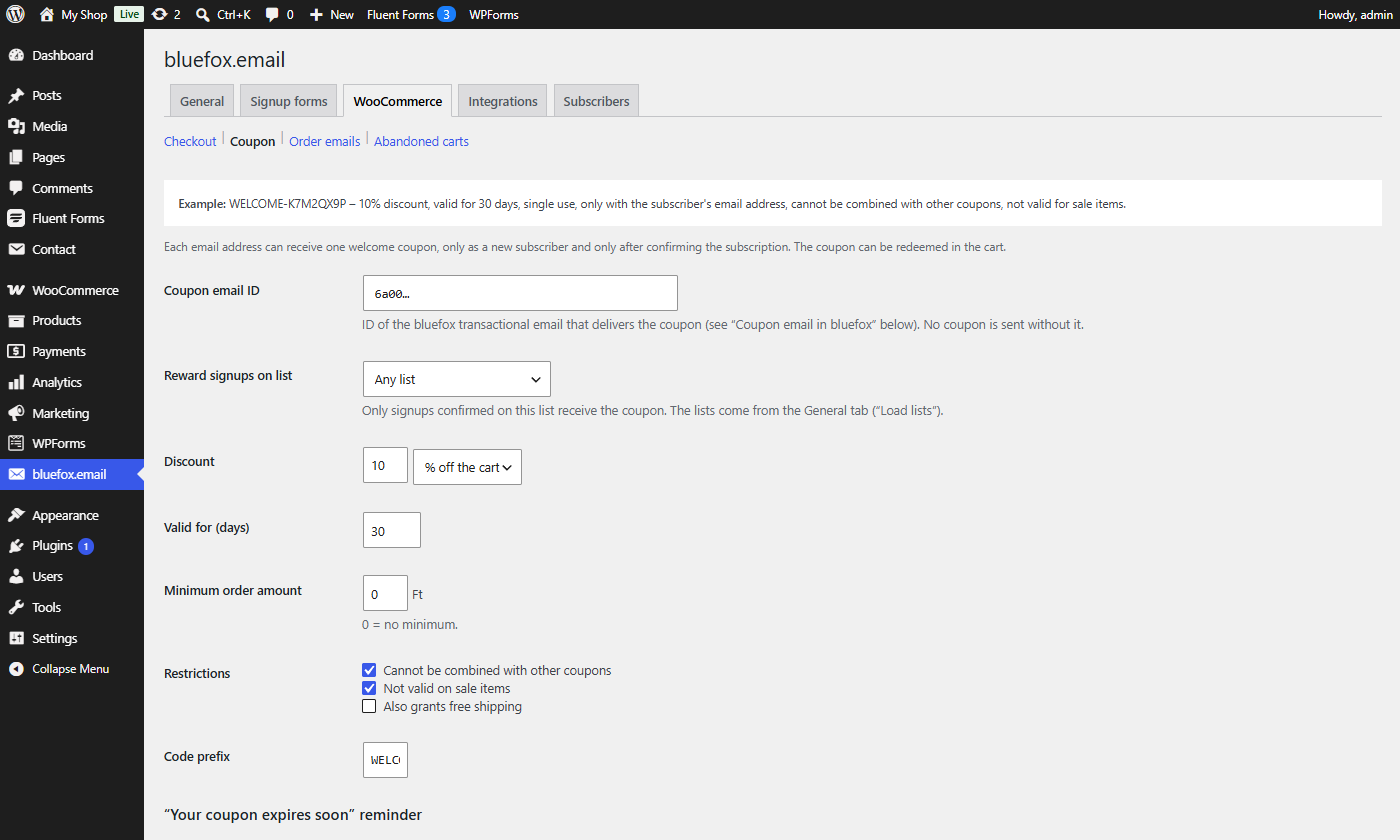
New subscribers get a single-use WooCommerce coupon by email after they confirm the double opt-in email.
Rules
- One coupon per email address. The lookup is by the normalised email; a second signup never creates a second coupon.
- One coupon per mailbox (Coupon tab, Email aliases, on by default). Aliases such as
name+shop@example.comand Gmail addresses written with dots (j.ane@gmail.com, alsogooglemail.com) count as the same mailbox. An alias of an address that already got a coupon gets none: its row becomes Already subscribed (no coupon) with a note. - Only new subscribers who signed up through this plugin. People who were already active on the list, came back from paused, or reached the list another way (bluefox import, bluefox's own form) get no coupon.
- Only after confirmation. The status is read from the bluefox API before the coupon is created. Signups not confirmed within the Confirmation deadline (Emails tab, default 14 days) expire without a coupon.
- Only on the chosen list if Reward signups on list is set; otherwise confirmed signups on any list qualify.
Tell visitors in your offer: one welcome coupon per email address, redeemable in the cart.
When a personal data erasure request is processed, unused welcome coupons of the address are deleted and used ones are anonymised. See Privacy and GDPR.
The coupon
| Property | Value |
|---|---|
| Code | prefix + 8 random characters (no 0/O/1/I), e.g. WELCOME-K7M2QX9P |
| Discount | % off the cart or a fixed amount off the cart |
| Usage limit | 1, and 1 per user |
| Allowed emails | only the subscriber's email |
| Expiry | end of the day, Valid for (days) after creation |
| Options | minimum order amount, individual use, exclude sale items, free shipping |
The coupon description is Newsletter welcome coupon – email. Meta _cfbe_welcome_email and _cfbe_source link it to the signup.
The coupon email
The coupon is sent with a bluefox transactional email. The quickest way: on the Email templates tab, open Welcome coupon and click Create in bluefox – the email is created and selected as the coupon email. This is how it arrives (real email from a test shop, WooCommerce email design):
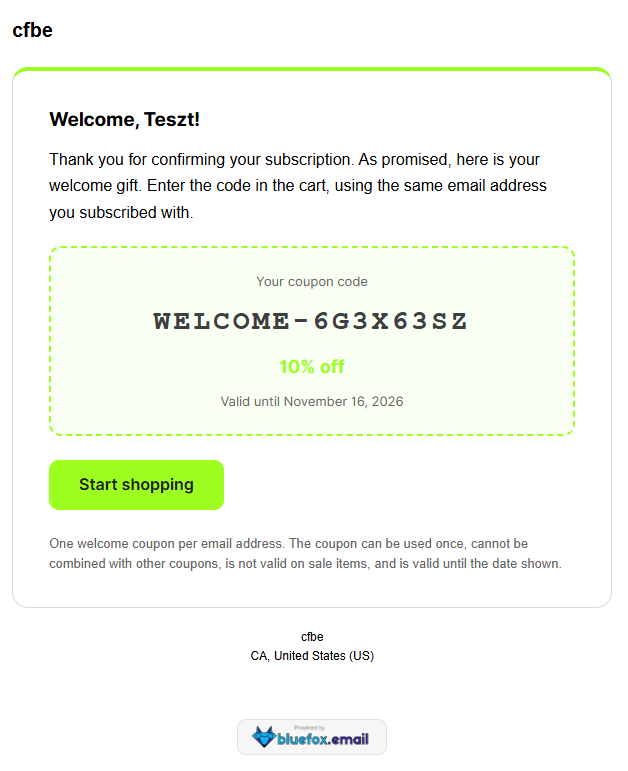
To design your own instead:
- In bluefox create a transactional email of type HTML (e.g. Welcome coupon), subject for example
Your {{discount}} welcome coupon. - Paste the Welcome coupon template from the Coupon tab (also in
templates/emails/welcome-coupon.html) and adjust it. - Copy the email ID into Coupon email ID. No coupon is sent without it.
Merge tags: {{couponCode}}, {{discount}}, {{expiry}}, {{minSpend}}, {{terms}}, {{name}}, {{shopName}}, {{shopUrl}} and contact fields such as {{contact.name}}. See Email template data.
The coupon email is transactional (no unsubscribe link). Keep it about the coupon only.
If creating the coupon or sending the email fails, the job is retried every 10 minutes, up to 5 attempts. Admins can resend the coupon email (same code) from the Subscribers tab or with wp cfbe resend-coupon <email>.
"Your coupon expires soon" reminder
The plugin reminds subscribers who have not used their welcome coupon yet, once, a few days before it expires.
- On the Email templates tab, click Create on Coupon expiry reminder and choose your newsletter list. The email is selected as Reminder email ID on the Coupon tab.
- Set Reminder before expiry (days) (default 5).
How it works:
- Every hour the plugin looks for welcome coupons that expire within that many days and have not been used (WooCommerce usage count 0).
- Each one gets the reminder once. It is a triggered (marketing) email: bluefox delivers it only to active subscribers of the email's list and adds the unsubscribe link, so people who unsubscribed or paused the newsletter never get it.
- Reminders go out between 9:00 and 20:00 site time.
- A failed send is retried every hour, up to 3 times.
wp cfbe remind-couponssends the due reminders right away (also outside the daytime window).
The email gets the coupon email's data plus {{daysLeft}}. See Email template data. Leave Reminder email ID empty to switch the reminder off.
Coupon data in bluefox (on by default) also writes couponCode, couponExpires and couponUsed to the bluefox contact, for your own campaigns and segments. couponUsed follows WooCommerce: it is set when an order with the coupon is placed and cleared when that order is cancelled. Click Create bluefox fields to create the name, couponCode, couponExpires and couponUsed fields.