Settings reference
All settings are under bluefox.email in the wp-admin menu (wp-admin/admin.php?page=cfbe-newsletter). Each tab has its own URL: …&tab=<tab id>.
The tabs are grouped under five main tabs; the sub-tabs of the active group are shown as links below them:
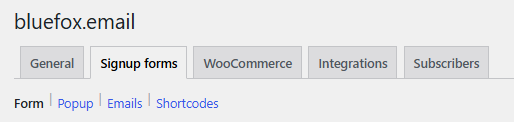
| Main tab | Sub-tabs |
|---|---|
| General | General · Email templates |
| Signup forms | Form · Popup · Emails · Shortcodes |
| WooCommerce | Checkout · Coupon · Order emails · Abandoned carts |
| Integrations | Contact sync · Email delivery · Form integrations · Webhooks |
| Subscribers | Subscribers · Privacy · Logs |
A main tab only appears when at least one of its sub-tabs is switched on. Tabs added by other plugins appear under More unless they set a group key in the cfbe_settings_tabs filter.
Only administrators see the page by default. Developers can change the capability with the cfbe_capability filter (for example manage_woocommerce for shop managers).
| Tab | Tab id | Shown when | Option |
|---|---|---|---|
| General | api |
always | cfbe_api, cfbe_modules |
| Email templates | email_templates |
always | cfbe_email_templates |
| Form | form |
Signup forms on | cfbe_form |
| Popup | popup |
Signup forms on | cfbe_popup |
| Checkout | checkout |
Checkout opt-in on | cfbe_checkout |
| Coupon | coupon |
Welcome coupon on | cfbe_coupon |
| Contact sync | sync |
Contact sync on | cfbe_sync |
| Email delivery | mailer |
Send WordPress emails via bluefox on | cfbe_mailer |
| Emails | emails |
Signup forms on | cfbe_emails |
| Order emails | woo_events |
Order emails on | cfbe_woo_events |
| Abandoned carts | abandoned_cart |
Abandoned cart emails on | cfbe_woo_events |
| Form integrations | integrations |
at least one form plugin integration on | cfbe_integrations |
| Webhooks | webhooks |
Inbound webhooks on | cfbe_webhooks |
| Shortcodes | shortcodes |
Signup forms on | – |
| Subscribers | subscribers |
always | – |
| Privacy | privacy |
always | cfbe_api |
| Logs | logs |
always | – |
How settings are stored
- Each area is one array option,
cfbe_<area>. The Option key column on each page uses the form field name, e.g.cfbe_form[heading]. - Stored values are merged over the defaults, so a key you never saved has its default value.
- Every save goes through a sanitizer: unknown keys are dropped, numbers are clamped to their range and invalid choices fall back to the default. The ranges are listed on each page.
- Developers can add fields to an area with the
cfbe_settings_defaults_{area}andcfbe_sanitize_settings_{area}filters – see Hooks.
Text placeholders
{discount} in form, popup, promo and checkout texts is replaced with the welcome coupon value from the Coupon tab, e.g. 10%.