Form tab
Tab id: form · Option: cfbe_form · Needs: Signup forms.
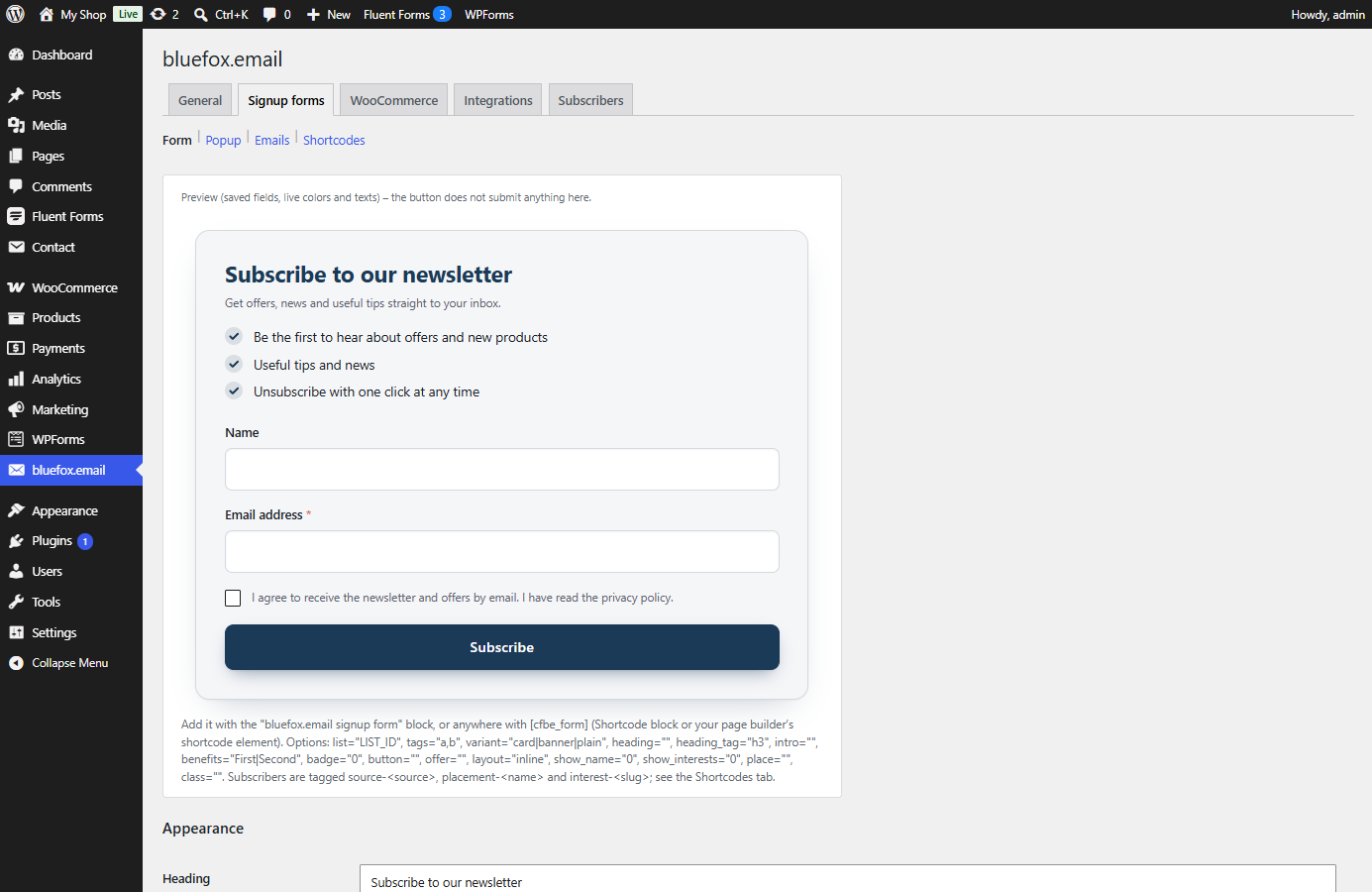
These settings are shared by the block, [cfbe_form], [cfbe_promo] and the popup. Block and shortcode attributes override them for a single placement. The top of the tab shows a live preview (colours and texts update as you type; the button does not submit). See Signup forms.
Appearance
| Label | Option key | Default | What it does |
|---|---|---|---|
| Heading | cfbe_form[heading] |
Subscribe to our newsletter | Form heading. Empty = no heading. {discount} is replaced. |
| Button text | cfbe_form[button] |
Subscribe | Submit button label. |
| Offer line (below the button) | cfbe_form[offer] |
empty | Short line under the button, e.g. {discount} off your first order. Empty = hidden. |
| Intro text | cfbe_form[intro] |
Get offers, news and useful tips straight to your inbox. | Paragraph under the heading. Empty = hidden. |
| Promo bar – [cfbe_promo] → Title | cfbe_form[promo_heading] |
Join our newsletter | Heading of the promo box / bar. |
| Promo bar → Text | cfbe_form[promo_text] |
Offers, news and tips – straight to your inbox. | Text of the promo box. |
| Promo bar → Button | cfbe_form[promo_button] |
Subscribe | Promo button label. |
| Promo bar → The button | cfbe_form[promo_action] |
dialog (opens the form in a popup) |
scroll (scrolls to the form on the page) jumps to the last [cfbe_form] on the page or to the target element; without a form it opens the popup. |
| Benefits (one per line) | cfbe_form[benefits] |
three example lines | Checkmark list under the heading, at most 5 lines. Empty = hidden. |
| Style | cfbe_form[variant] |
card |
card (light background, subtle border), banner (primary colour background, light button), plain (no decoration). |
| Offer badge | cfbe_form[badge_enabled] |
off | Shows a small badge above the heading in the Card and Banner styles and in the promo bar. |
| Offer badge → Value | cfbe_form[badge_text] |
{discount} |
Large text of the badge, e.g. 10% or Free guide. |
| Offer badge → Label | cfbe_form[badge_label] |
coupon | Small text under the value. |
| Layout | cfbe_form[layout] |
stacked |
stacked or inline (fields in one row on wide screens). |
| Corner radius (px) → Button | cfbe_form[radius_button] |
10 |
0–30. |
| Corner radius (px) → Field | cfbe_form[radius_input] |
8 |
0–30. |
| Loading | cfbe_form[assets_everywhere] |
off | Load CSS/JS on every page instead of only where a form appears. Avoids a flash of unstyled content with page builders. |
Colors
Each colour is a hex value; an invalid value falls back to the default. Reset default colors restores all of them. They are printed as CSS custom properties (--cfbe-<name>), see Shortcodes and block.
| Label | Option key | Default | CSS variable |
|---|---|---|---|
| Button / highlight | cfbe_form[color_primary] |
#1b3a57 |
--cfbe-primary |
| Button – hover | cfbe_form[color_primary_hover] |
#132b42 |
--cfbe-primary-hover |
| Button text | cfbe_form[color_button_text] |
#ffffff |
--cfbe-button-text |
| Focus / asterisk | cfbe_form[color_accent] |
#d9603b |
--cfbe-accent |
| Text | cfbe_form[color_text] |
#1c2026 |
--cfbe-text |
| Muted text | cfbe_form[color_muted] |
#5b6270 |
--cfbe-muted |
| Field background | cfbe_form[color_background] |
#ffffff |
--cfbe-background |
| Field border | cfbe_form[color_border] |
#d5d9e0 |
--cfbe-border |
| Error | cfbe_form[color_error] |
#b42318 |
--cfbe-error |
| Success | cfbe_form[color_success] |
#1a7f52 |
--cfbe-success |
| Card background | cfbe_form[color_card] |
#f5f6f8 |
--cfbe-card |
The corner radii become --cfbe-radius-button and --cfbe-radius-input.
Fields
| Label | Option key | Default | What it does |
|---|---|---|---|
| Name field → Show | cfbe_form[name_enabled] |
on | Shows the optional Name field. |
| Name field → Required | cfbe_form[name_required] |
off | Makes the name required. |
| Interests → Show | cfbe_form[interests_enabled] |
on | Shows the interests field – only when at least one option is set. |
| Interests → Required | cfbe_form[interests_required] |
off | At least one interest must be picked. |
| Interests → Dropdown / Checkboxes | cfbe_form[interests_mode] |
select |
select (Dropdown (single choice)) or checkbox (Checkboxes (multiple choice)). |
| Question text | cfbe_form[interests_label] |
What are you most interested in? | Label of the interests field. |
| Options | cfbe_form[interests][n][label], [tag] |
none | Up to 12 rows of Label and bluefox tag. An empty tag is generated from the label (Special offers → interest-special-offers). Duplicate tags are dropped. Rows can be reordered with ↑ / ↓. |
See Interests and tags.
Consent
| Label | Option key | Default | What it does |
|---|---|---|---|
| Checkbox text | cfbe_form[consent_label] |
I agree to receive the newsletter and offers by email. I have read the privacy policy. | Label of the required consent checkbox. Stored with every signup as proof of consent. Empty = the default text. |
| Privacy policy URL | cfbe_form[privacy_url] |
empty | Linked from the consent checkbox and from the classic checkout opt-in. |
Messages
Shown after submit. An empty value falls back to the default text.
| Label | Option key | Default |
|---|---|---|
| Successful signup | cfbe_form[msg_pending] |
Thank you! We have sent you a confirmation email. Please click the link in it to complete your subscription. |
| Already subscribed | cfbe_form[msg_already] |
This email address is already subscribed to our newsletter. |
| Error | cfbe_form[msg_error] |
Sorry, we could not subscribe you right now. Please try again later. |
Subscription status
| Label | Option key | Default | What it does |
|---|---|---|---|
| Show the "Already subscribed" message | cfbe_form[reveal_subscribed] |
off | Off: every successful signup shows Successful signup, so the form never reveals whether an address is on your list. On: subscribers who sign up again see Already subscribed – which also tells anyone who types their address. |