Contact sync
Switch: Contact sync. Settings: Contact sync tab.
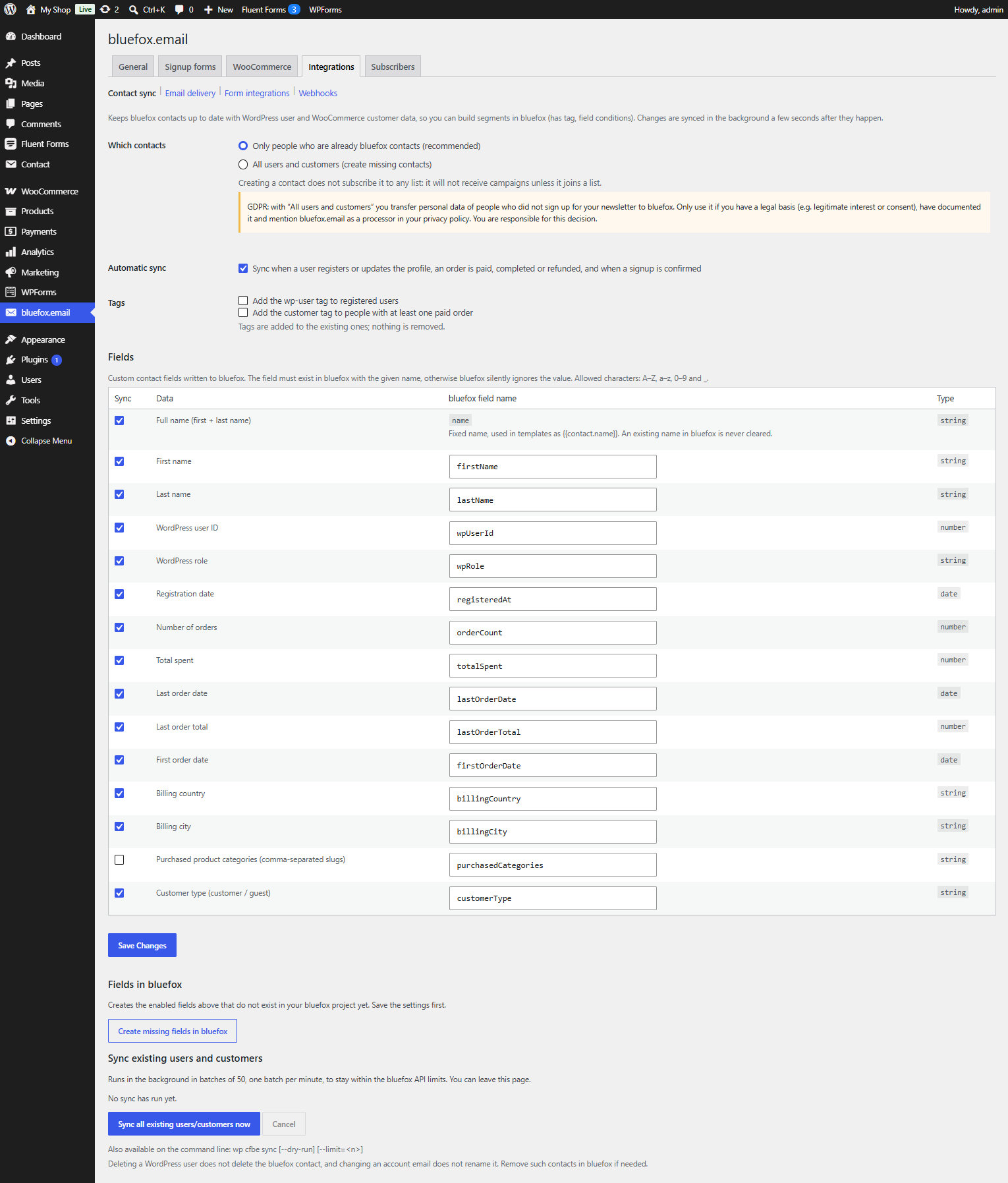
Keeps bluefox contacts up to date with WordPress user and WooCommerce customer data, so you can build segments in bluefox with tags and field conditions – for example "customers with more than 3 orders" or "no order in the last 90 days".
Which contacts
| Option | What happens |
|---|---|
| Only people who are already bluefox contacts (default, recommended) | existing contacts are updated; people who are not in bluefox are skipped |
| All users and customers | missing contacts are created too |
A created contact is not on any list, so it receives no campaigns until it joins one.
GDPR
With All users and customers you send personal data of people who never signed up for your newsletter to bluefox. Use it only with a documented legal basis, and list bluefox.email as a processor in your privacy policy.
A contact is only synced if the email belongs to a WordPress user or has at least one paid order.
Fields
Each row of the Fields table is one bluefox contact field. Tick Sync, and change the bluefox field name if you like (A–Z, a–z, 0–9 and _).
| Data | Default name | Type | On by default |
|---|---|---|---|
| Full name (first + last name) | name (fixed) |
string | yes |
| First name | firstName |
string | yes |
| Last name | lastName |
string | yes |
| WordPress user ID | wpUserId |
number | yes |
| WordPress role | wpRole |
string | yes |
| Registration date | registeredAt |
date | yes |
| Number of orders | orderCount |
number | yes |
| Total spent | totalSpent |
number | yes |
| Last order date | lastOrderDate |
date | yes |
| Last order total | lastOrderTotal |
number | yes |
| First order date | firstOrderDate |
date | yes |
| Billing country | billingCountry |
string | yes |
| Billing city | billingCity |
string | yes |
| Purchased product categories (comma-separated slugs) | purchasedCategories |
string | no |
Customer type (customer / guest) |
customerType |
string | yes |
The fields from Number of orders down need WooCommerce. For registered customers and guests alike, the order count and total spent are calculated from their paid orders (processing or completed), minus refunds. Dates are sent as YYYY-MM-DD.
The fields must exist in bluefox, otherwise bluefox silently ignores the values. Save the settings, then click Create missing fields in bluefox.
namekeeps its name, so{{contact.name}}works in templates. An existing name in bluefox is never cleared.- Only changed values are sent.
Tags
- Add the
wp-usertag to registered users. - Add the
customertag to people with at least one paid order.
Both are off by default. Tags are added to the existing ones; nothing is removed.
Automatic sync
With Automatic sync on (default), a contact is synced in the background about 30 seconds after:
- a user registers or updates their profile, or a customer saves an address;
- an order becomes
processing,completedorrefunded; - a signup is confirmed (
cfbe_signup_confirmed).
Several changes to the same person within a few seconds are combined into one sync.
Backfill
To sync everyone who is already on the site, click Sync all existing users/customers now.
- It runs in the background in batches of 50, one batch per minute, with a short pause between contacts, to stay within the bluefox API limits. You can leave the page.
- Registered users come first, then guest customers (billing emails of paid guest orders).
- The progress line shows the counts per result (created, updated, unchanged, not a contact, …). Cancel stops the run.
Contact sync → Sync all existing users/customers now.
# Preview the first 10 contacts without writing to bluefox
wp cfbe sync --dry-run --limit=10

# Sync everyone in the foreground
wp cfbe sync
See WP-CLI.
Limits
- Deleting a WordPress user does not delete the bluefox contact, and changing an account email does not rename it. Clean these up in bluefox if needed.
- Developers can add or change values with the
cfbe_sync_contact_datafilter and slow the backfill down withcfbe_sync_contact_pause_ms– see Hooks.