Shortcodes and block
All shortcodes and the block need the Signup forms module, except [cfbe_preferences], which needs Subscription preferences page. The Shortcodes tab in wp-admin lists the same reference with ready-to-copy examples.
Signup form
The full form directly on the page. Use the block in the block editor and the shortcode everywhere else (classic editor, widgets, page builders).
Block name: cfbe/signup-form (bluefox.email signup form, category Widgets). It renders on the server and supports wide and full alignment.
| Attribute | Type | Default | Description |
|---|---|---|---|
list |
string | "" |
bluefox list ID. Empty = the default list from the General tab. The editor offers the cached lists. Only lists loaded with Load lists or chosen in the settings are used; others fall back to the default list. |
tags |
string | "" |
Extra bluefox tags, comma-separated. |
heading |
string | "" |
Heading. Empty = the Form tab heading. |
intro |
string | "" |
Intro text. Empty = the Form tab intro. |
button |
string | "" |
Button label. Empty = the Form tab label. |
variant |
string | "" |
card, banner or plain. Empty = the Form tab style. |
showName |
boolean | true |
false hides the Name field. |
showInterests |
boolean | true |
false hides the interests field. |
place |
string | "" |
Placement name; adds the placement-<name> tag. |
Unlike the shortcode, an empty text in the block falls back to the Form tab; it does not hide the element. The block's Additional CSS class and alignment are added to the outer element. Subscribers get the source-block tag.
[cfbe_form], with [cfbe_newsletter] as an alias. Subscribers get the source-shortcode tag.
| Attribute | Values | Default | Description |
|---|---|---|---|
list |
list ID | General tab list | bluefox list to subscribe to. Must be a list loaded with Load lists on the General tab or chosen in the settings; otherwise the default list is used. |
tags |
comma-separated | – | Extra bluefox tags (lowercase letters, digits, hyphens; max. 20). |
variant |
card, banner, plain |
Form tab (Style) | card: light card · banner: coloured band · plain: no decoration. |
layout |
stacked, inline |
Form tab | inline: fields in one row on wide screens. |
heading |
text | Form tab | {discount} is replaced with the coupon value. Empty ("") hides it. |
heading_tag |
h2, h3, h4 |
h2 |
Heading level. |
intro |
text | Form tab | {discount} is replaced. Empty hides it. |
benefits |
items separated by a vertical bar | Form tab | Checkmarked benefits, max. 5 (see the example below). Empty hides the list. |
badge |
0 |
Form tab | badge="0" hides the offer badge (card and banner styles). |
button |
text | Form tab | Submit button label. |
offer |
text | Form tab | Small print below the button. Empty hides it. |
show_name |
0 |
Form tab | show_name="0" hides the Name field. It can only turn it off. |
show_interests |
0 |
Form tab | show_interests="0" hides the interests field. It can only turn it off. |
place |
name | – | Placement name; adds the placement-<name> tag (lowercase, max. 30 characters). |
class |
CSS classes | – | Extra class on the outer element. |
Signed list and tags
list, tags and place are signed into the form with an HMAC (field cfbe_cfg), so visitors cannot change them in the browser.
Promo bar
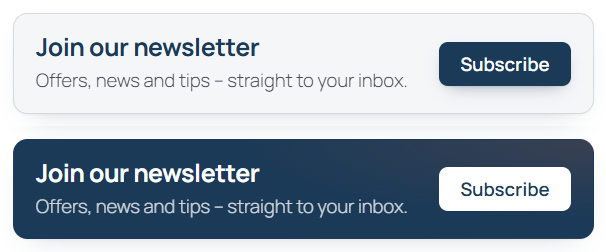
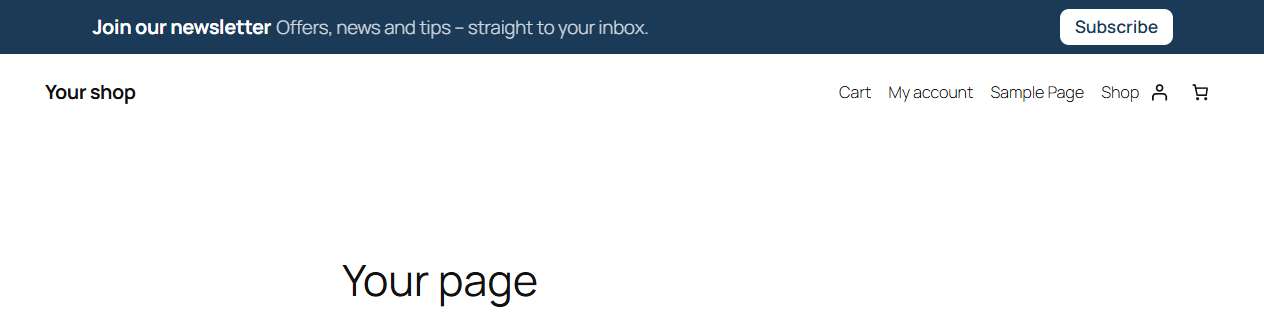
[cfbe_promo] – a compact bar or box with a button that opens the full form in a dialog, or scrolls to a form on the page. Subscribers get the source-promo tag.
style="light" and style="dark" |
style="bar" corners="round" |
|---|---|
 |
 |
| Attribute | Values | Default | Description |
|---|---|---|---|
style |
light, dark, bar |
light |
light: light box · dark: coloured box · bar: slim single-row bar. |
corners |
square, round |
square |
Only with style="bar": round is a rounded box for use in content. |
action |
dialog, scroll |
Form tab (Promo bar → Button action) | scroll scrolls to the form on the page and focuses the email field; without a form it opens the dialog. |
target |
CSS selector, e.g. #newsletter |
the last form on the page | Only with action="scroll". |
heading |
text | Form tab (Promo bar) | {discount} is replaced. |
text |
text | Form tab (Promo bar) | One-line supporting text (hidden on mobile with the bar style). Empty hides it. |
button |
text | Form tab (Promo bar) | Button label. |
form_variant |
card, banner, plain |
card |
Style of the form in the dialog. |
place |
name | – | Placement name for the placement-<name> tag. |
list |
list ID | General tab list | List for the form in the dialog. |
tags |
comma-separated | – | Extra tags for the form in the dialog. |
[cfbe_promo style="bar" place="top"]
[cfbe_promo style="bar" place="top" action="scroll"]
[cfbe_promo style="dark" place="product"]
The offer badge is shown when it is switched on on the Form tab.
Thank-you page
[cfbe_thankyou] – the message after the double opt-in confirmation. The state comes from the ?cfbe= URL parameter: none → confirmed, expired → expired link, error → error. The texts are edited on the Emails tab.
| Attribute | Values | Default | Description |
|---|---|---|---|
tag |
h1, h2, h3, h4 |
h1 |
Title level. |
show_title |
0, 1 |
1 |
show_title="0" hides the title when the page has its own heading. |
Output: a div.cfbe-thankyou.cfbe-thankyou--{state} with .cfbe-thankyou__title and .cfbe-thankyou__text.
Preferences page
[cfbe_preferences] – the page behind the bluefox unsubscribe / pause links (?token=…). It shows the subscription status and lets the subscriber pause for 1, 3 or 6 months, unsubscribe or resubscribe. Without a token it only shows the intro text. See Preferences page.
| Attribute | Values | Default | Description |
|---|---|---|---|
tag |
h1, h2, h3, h4 |
h1 |
Title level. |
show_title |
0, 1 |
1 |
show_title="0" hides the title. |
The page works without JavaScript: the buttons post back to the same URL and redirect (303) to ?token=…&cfbe_done=…, where the value is paused, unsubscribed, resubscribed, error or expired.