Email delivery
Switch: Send WordPress emails via bluefox. Settings: Email delivery tab.
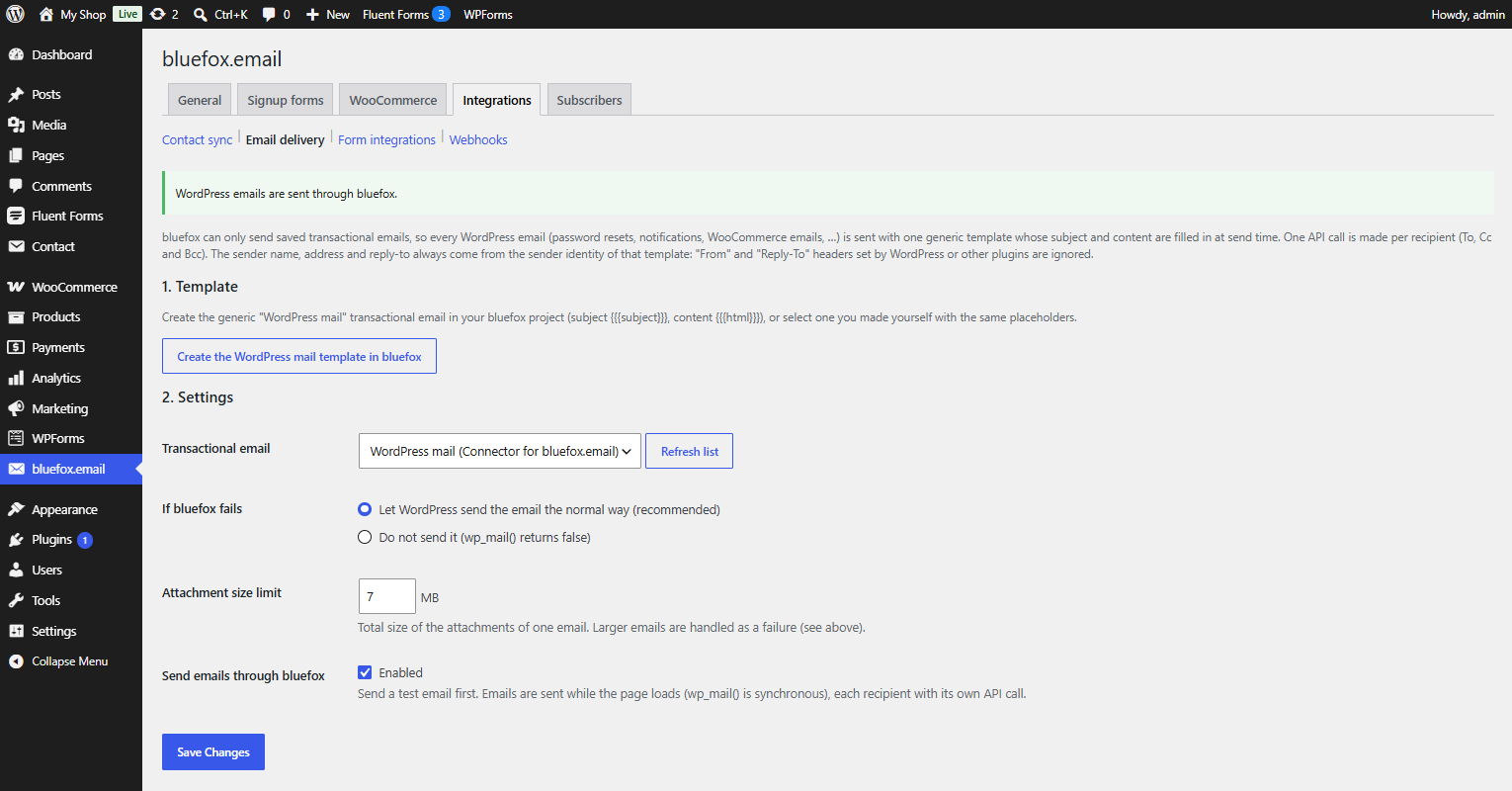
Routes wp_mail() – password resets, admin notifications, WooCommerce emails, form plugin notifications – through the bluefox transactional API instead of your server's mail function or an SMTP plugin.
How it works
bluefox can only send saved transactional emails. So the plugin uses one generic template whose subject and content are filled in at send time:
- subject
{{{subject}}}; - content
{{{html}}}; - preview text
{{previewText}}(the first 100 characters of the text).
HTML emails are passed through as they are. Plain-text emails are escaped, links are made clickable and paragraphs are added.
- One API call per recipient. To, Cc and Bcc each get their own copy.
- The sender comes from bluefox. The sender name, address and reply-to are those of the template's sender identity.
FromandReply-Toheaders set by WordPress or other plugins are ignored. - Attachments are sent along, up to the Attachment size limit (default 7 MB, at most 40 MB per email). Unreadable files are skipped.
- Multipart messages (a hand-built MIME body) are left to WordPress.
- Sending happens while the page loads, like
wp_mail()always does.
Set it up
- Template – click Create the WordPress mail template in bluefox, choose a sender identity and click Create template. This creates WordPress mail (Connector for bluefox.email). You can also select your own transactional email that uses the same placeholders.
- Settings – choose it as Transactional email and pick what happens If bluefox fails.
- Test – enter an address and click Send test email.
- Tick Send emails through bluefox → Enabled and save.
The notice at the top of the tab shows the current state: not live yet, enabled but no template selected, or WordPress emails are sent through bluefox.
If bluefox fails
| Option | Result |
|---|---|
| Let WordPress send the email the normal way (default, recommended) | the email goes out through the default mailer (or your SMTP plugin). If some recipients already got it, only the failed ones are retried |
| Do not send it | wp_mail() returns false and wp_mail_failed fires |
The core actions wp_mail_succeeded and wp_mail_failed fire as usual, so mail logging plugins keep working. The plugin also fires cfbe_mailer_failed before falling back – see Hooks.
Recent deliveries
The tab lists the last 50 emails with time, recipient, subject (shortened) and result: Sent, Test sent, Failed or Failed, sent by WordPress. Email addresses in error notes are masked.
Sending limits
Every WordPress email counts against your bluefox sending limit, and a sandbox project only delivers a few emails a day. Verify your domain and get production access before you enable this on a live site.