General tab
Tab id: api · Options: cfbe_api (connection) and cfbe_modules (feature switches).
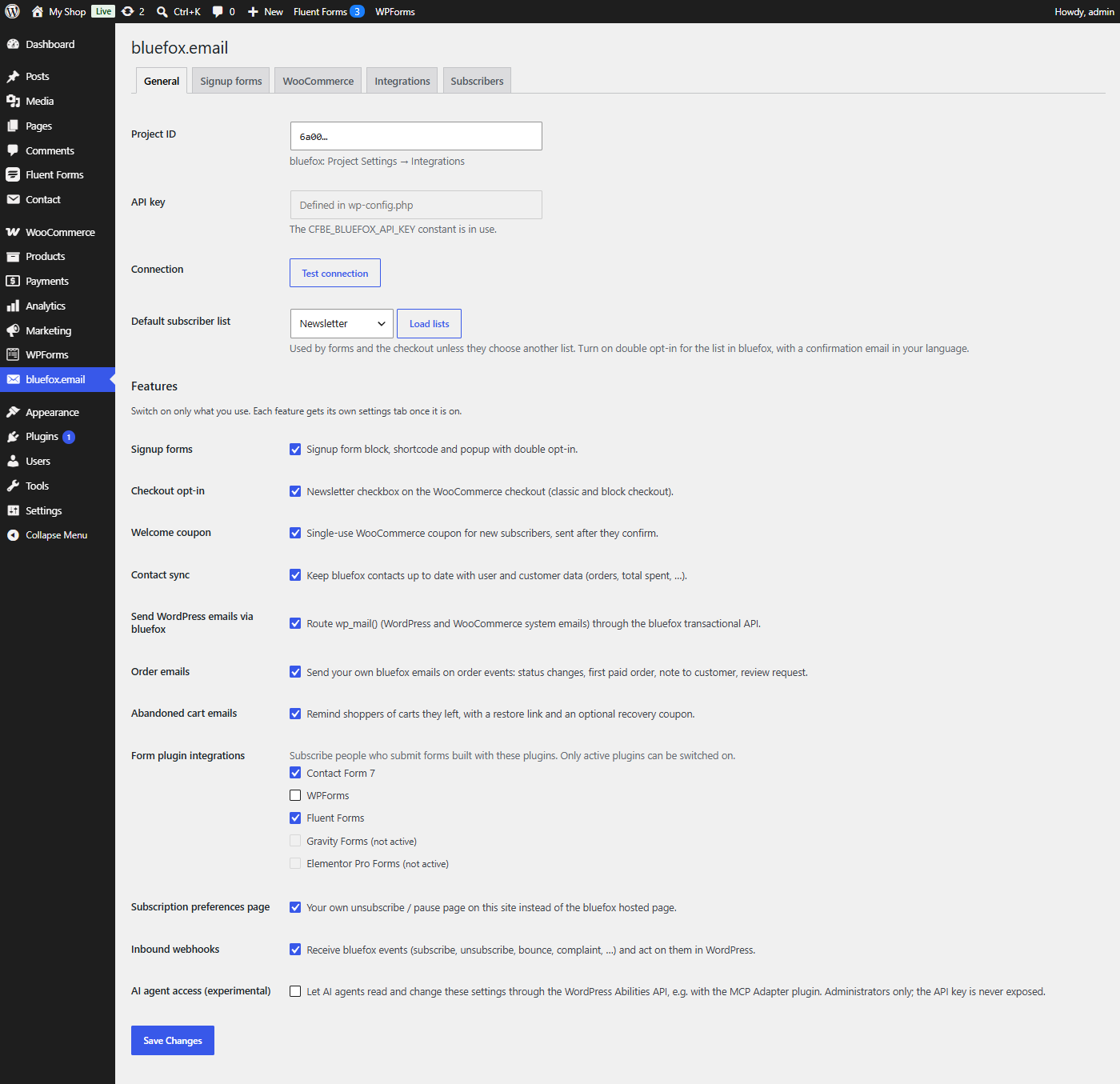
See Connect to bluefox.email for a walkthrough.
Connection
| Label | Option key | Default | What it does |
|---|---|---|---|
| Project ID | cfbe_api[project_id] |
empty | Your bluefox project ID (Project Settings → Integrations). Only letters and digits are kept. |
| API key | cfbe_api[api_key] |
empty | bluefox API key (Project Settings → API Keys & Domain Whitelist). A password field: the stored key is never shown, and an empty field on save keeps the stored key. Disabled with Defined in wp-config.php when the CFBE_BLUEFOX_API_KEY constant is set – the constant always wins. |
| Connection → Test connection | – | – | Checks the saved project ID and key against the bluefox API. Save first. |
| Default subscriber list | cfbe_api[list_id] |
empty | The list used by forms, the popup, the checkout opt-in and form integrations unless they choose another one. Load lists fetches your lists (cached for a day) and marks the ones with double opt-in on. A list ID that is not among the loaded lists is rejected and the previous value kept. The loaded lists are also remembered in the cfbe_known_lists option: a block or shortcode may only target these lists or a list chosen in the settings (see Signup forms). |
cfbe_api[webhook_secret] is stored here too but shown on the Webhooks tab. A missing or malformed secret is regenerated on save (32 letters and digits). The IP and erase settings of the Privacy tab are also stored in cfbe_api.
Features
Each switch loads one module. A module that is off loads no code and shows no tab. See Switch on features.
| Label | Option key | Default | What it does |
|---|---|---|---|
| Signup forms | cfbe_modules[forms] |
on | Block, [cfbe_form], [cfbe_promo], [cfbe_thankyou] and the popup. Adds the Form, Popup, Emails and Shortcodes tabs. See Signup forms. |
| Checkout opt-in | cfbe_modules[checkout] |
off | Newsletter checkbox on the classic and block checkout. Needs WooCommerce. See Checkout opt-in. |
| Welcome coupon | cfbe_modules[coupon] |
off | Single-use coupon for new subscribers after they confirm. Needs WooCommerce. See Welcome coupon. |
| Contact sync | cfbe_modules[sync] |
off | Writes user and customer data to bluefox contacts. See Contact sync. |
| Send WordPress emails via bluefox | cfbe_modules[mailer] |
off | Adds the Email delivery tab. Mail is only rerouted once you also tick Send emails through bluefox there. See Email delivery. |
| Order emails | cfbe_modules[order_emails] |
off | Your bluefox emails on order events. Needs WooCommerce. See Order emails. |
| Abandoned cart emails | cfbe_modules[abandoned_cart] |
off | Cart reminders with an optional recovery coupon. Needs WooCommerce. See Abandoned cart emails. |
| Form plugin integrations | cfbe_modules[integration_cf7], [integration_wpforms], [integration_fluentforms], [integration_gravityforms], [integration_elementor] |
off | One checkbox per form plugin: Contact Form 7, WPForms, Fluent Forms, Gravity Forms, Elementor Pro Forms. Only active plugins can be switched on. See Form plugin integrations. |
| Subscription preferences page | cfbe_modules[preferences] |
on | The [cfbe_preferences] page. See Preferences page. |
| Inbound webhooks | cfbe_modules[webhooks] |
on | Stores and processes bluefox events and adds the Webhooks tab. See Inbound webhooks. |
| AI agent access (experimental) | cfbe_modules[abilities] |
off | Registers the plugin's abilities for AI agents. Needs WordPress 6.9+. See AI agent access. |
A switch whose requirement is missing is disabled and shows Requires WooCommerce., Requires WordPress 6.9 or later. or (not active). If it was on, it stays saved as on and works again when the requirement returns.