Coupon tab
Tab id: coupon · Option: cfbe_coupon · Needs: Welcome coupon and WooCommerce.
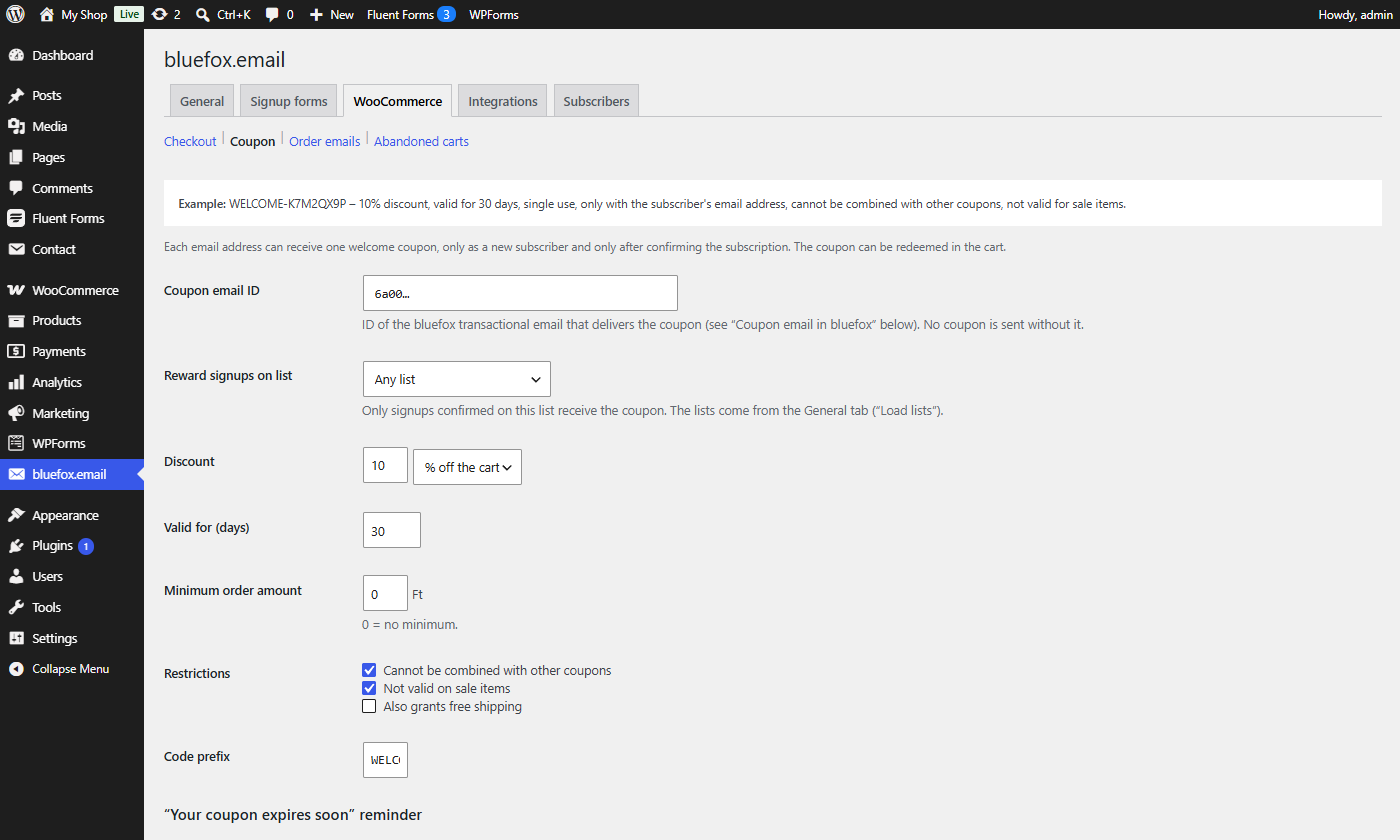
The top of the tab shows an example of the coupon with the current settings, e.g. WELCOME-K7M2QX9P – 10% discount, valid for 30 days, single use, only with the subscriber's email address, …. See Welcome coupon.
Coupon
| Label | Option key | Default | What it does |
|---|---|---|---|
| Coupon email ID | cfbe_coupon[email_id] |
empty | ID of the bluefox transactional email that delivers the coupon. No coupon is sent without it. Letters and digits only. |
| Reward signups on list | cfbe_coupon[list_id] |
empty (Any list) | Only signups confirmed on this list receive the coupon. |
| Discount → amount | cfbe_coupon[amount] |
10 |
Must be greater than 0 (otherwise the default is restored with a notice). Percent values are capped at 100. A decimal comma is accepted. |
| Discount → type | cfbe_coupon[discount_type] |
percent |
percent (% off the cart) or fixed_cart (<currency> off the cart). |
| Valid for (days) | cfbe_coupon[expiry_days] |
30 |
1–365. The coupon expires at the end of that day. |
| Minimum order amount | cfbe_coupon[minimum_amount] |
0 |
0 = no minimum. |
| Restrictions → Cannot be combined with other coupons | cfbe_coupon[individual_use] |
on | WooCommerce Individual use only. |
| Restrictions → Not valid on sale items | cfbe_coupon[exclude_sale_items] |
on | WooCommerce Exclude sale items. |
| Restrictions → Also grants free shipping | cfbe_coupon[free_shipping] |
off | WooCommerce Allow free shipping. |
| Code prefix | cfbe_coupon[code_prefix] |
WELCOME- |
Uppercased; letters, digits and hyphens; max. 10 characters. 8 random characters are appended. |
| Email aliases → One coupon per mailbox | cfbe_coupon[one_per_mailbox] |
on | Aliases such as name+shop@example.com and Gmail addresses written with dots (j.ane@gmail.com) count as one address, so one person cannot collect several coupons. The alias's row gets the status Already subscribed (no coupon) with a note. Off: each address gets its own coupon. |
"Your coupon expires soon" reminder
| Label | Option key | Default | What it does |
|---|---|---|---|
| Coupon data in bluefox | cfbe_coupon[store_code_in_bluefox] |
on | Update the couponCode, couponExpires and couponUsed fields on the bluefox contact. Create bluefox fields creates name, couponCode, couponExpires and couponUsed if missing. |
| Reminder before expiry (days) | cfbe_coupon[reminder_days] |
5 |
1–30. Unused welcome coupons get the reminder email this many calendar days before their last day (site time). |
| Reminder email ID | cfbe_coupon[reminder_email_id] |
empty | The bluefox triggered (marketing) email sent as the reminder, once per coupon, between 9:00 and 20:00 site time. Empty = no reminder. Create on the Coupon expiry reminder template fills it in. See Welcome coupon. |
Templates
Read-only, with Copy buttons:
- Coupon email in bluefox – setup steps and the list of merge tags sent with the coupon email (see Email template data).
- Welcome coupon template –
templates/emails/welcome-coupon.html. - Double opt-in confirmation template –
templates/emails/confirm-subscription.html; set it as the bluefox list's confirmation email. It must contain{{verifyLink}}.
cfbe_coupon[enabled] is kept for backwards compatibility and is always saved as true; the Welcome coupon switch on the General tab is the real on/off.
The Confirmation deadline for signups is on the Emails tab, because it applies to every signup, with or without a coupon.